Publish Evidence, Keep Administration Private
ABD Labs needs a public portfolio, but the Microsoft Enterprise Lab will contain administration paths and intentionally broken configurations during learning and incident scenarios.
Microsoft enterprise lab and technical portfolio
A public evidence record for Windows administration, identity, Microsoft 365 automation and infrastructure work. The lab is built from repeatable steps, and only sanitized outputs are published.
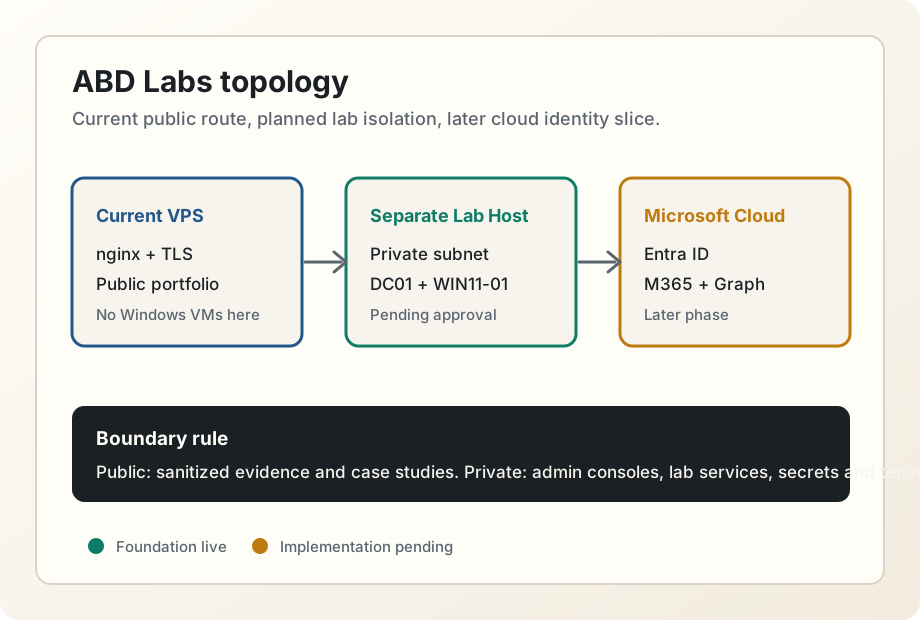
Static portfolio over TLS, with www redirected to the canonical domain.
No lab management services are exposed through the portfolio route.
Choose compute, private access, storage quota and snapshot policy.
Case studies
abdlabs.org serves a static HTTPS portfolio from this VPS, with www redirected, TLS issued and renewal verified.
nginx / Let's Encrypt / certbot / Static HTML ongoingThe lab has documented architecture, network, security, dataset and automation scaffolds without deploying Windows VMs or paid cloud resources.
Markdown architecture docs / Mermaid diagrams / Synthetic CSV data / PowerShell scaffoldsArchitecture log
ABD Labs needs a public portfolio, but the Microsoft Enterprise Lab will contain administration paths and intentionally broken configurations during learning and incident scenarios.
ABD Labs needed to move beyond a hand-written marker page while keeping the public site easy to version, build and serve from nginx.
Windows Lab V1 needs a domain controller, a Windows workstation, private administration, snapshots and repeatable rebuilds. The current VPS is already ruled out for Windows VMs.
Roadmap
The public portfolio source is now maintainable. The next lab step is to select the Lab V1 compute path and private access method before any Windows VM, hypervisor or paid cloud resource is created.